
How to Generate WhatsApp QR Codes That Drive Conversions
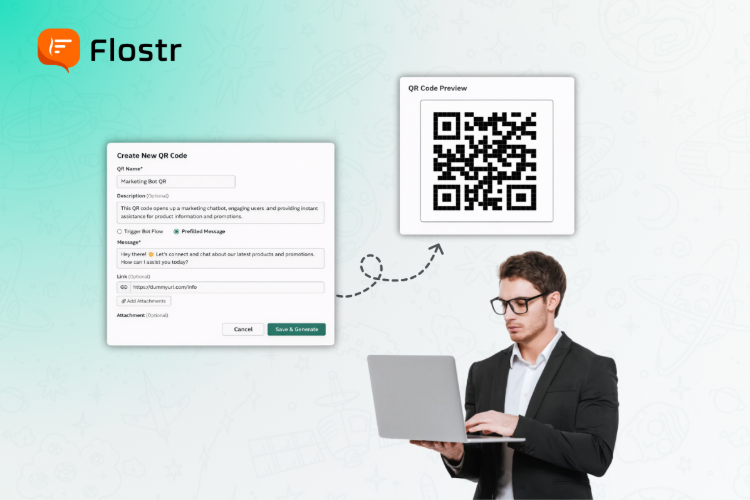
How to Generate WhatsApp QR Codes That Drive Conversions
Every business is looking for better methods to connect with customers. Instant messaging systems are replacing phone calls and emails as the primary means of communication. WhatsApp is the most popular among them, and the majority of businesses use it to connect with their audience directly.
However, the biggest problem most brands encounter is how to initiate the conversation with the customers. That is where the WhatsApp QR code generator is introduced. Customers can instantly open a WhatsApp chat just with a simple scan without saving numbers, searching, or resistance. Such a basic functionality can help increase the engagement and conversions to a considerable extent.
What Is a WhatsApp QR Code Generator?
You can create a scannable code with a WhatsApp QR code generator that can be used directly to get to your WhatsApp Business chat. Once a person scans it with the phone camera, they can immediately be redirected to a filled-in WhatsApp message containing your business account.
It is not only a convenience but a conversion tool. You will eliminate unnecessary processes and make it simpler to be connected, inquire, or place orders for potential customers. The sooner they can contact you, the more chances you will convert them.
The ability to transform any marketing channel, either online or offline, into a direct communication point with a well-designed QR code and make a call-to-action a sensible choice makes your life easier.
Why WhatsApp QR Codes Are Powerful for Conversions
The ease and speed of the interaction process are critical in the process of making conversions. Customers want fast communication, and WhatsApp is currently a demanding application. QR codes ensure instant communication.
That is why they are so popular with businesses:
Instant Engagement: With a single scan, your customer can directly reach you and shorten the time gap between interest and interaction.
Trust & Familiarity: WhatsApp is already an established platform of trust, so customers find it easier to communicate with the brands on this platform.
Higher Conversion Rates: Direct chats imply fast replies, personalised proposals and faster decisions.
Actionable Data: With WhatsApp Business analytics, you can measure performance and optimise your strategy. Concisely, each scan would be a conversion opportunity.
How to Generate a WhatsApp QR Code That Converts
Making a good QR code requires some planning, but creating one is simple. To ensure your WhatsApp QR codes truly provide results, stick to these easy measures.
1. Use a Reliable WhatsApp QR Code Generator
Begin with the selection of a reliable WhatsApp QR code generator that allows customisation of the business. A professional tool lets you:
- Add your brand colours and logo.
- Make trackable dynamic QR codes.
- Integrate directly with your Business number in WhatsApp.
- Insert canned messages to engage faster.
Select a platform that is analytics and customisable, such that your QR codes are in line with your marketing campaigns.
2. Add a Prefilled Message
Ready-made messages provide context to a conversation and assist you in capturing intent on the spot. For example:
“Hi! I would like to know about your product. Can you share more details?”
It saves time for the customers and makes your team quick in responding with the relevant information. It is a little gesture that makes the process of communication smoother.
3. Place WhatsApp Buttons Strategically
You can also integrate WhatsApp buttons on your site and landing pages, as well as on social media. Whereas QR codes can be used in offline/print media, WhatsApp buttons can be used to make digital visitors reach out to an organisation with a single button press.
- You can place these buttons:
- On your website’s contact or support page
- In email signatures
- On product listings or checkout pages
- Within digital ads or pop-ups
Combining buttons and QR codes is an experience of an omnichannel where customers can interact anywhere.
4. Customise the QR Code Design
Visual appeal matters. Make your QR code look more like your brand. Use matching colours, add your logo and a few words of call to action like Scan to Chat or Get Instant Support.
Customers' willingness to scan QR codes increases when the QR codes appear professional and trustworthy.
5. Track Results Using WhatsApp Business Analytics
As soon as your campaign is launched, monitor activity with the WhatsApp Business analytics. The insights can tell you:
- How many users scanned and messaged your business
- Which campaigns or QR placements perform best
- Response rates and conversion patterns
This information assists you in determining what is performing and what needs to be improved. In the long run, you will be able to streamline your message, positioning, and graphic design to increase performance.
Creative Ways to Use WhatsApp QR Codes
The following are some of the practical and imaginative applications that may be applied to maximise your WhatsApp QR code generator:
On Product Packaging: Customers can scan the code to get support or claim the special offers.
In Stores or Events: Customers can get in touch with your team instantly by displaying QR codes on banners or desks.
In Digital Ads: Add QR codes to Facebook, Instagram, or Google Ads to enable immediate response by mobile users.
On Printed Materials: Incorporate them in brochures, flyers or business cards so that they can be followed up easily.
In Feedback Campaigns: Get Instant Reviews and Suggestions on WhatsApp with QR code.
Such minor details would facilitate the conversion of casual contacts into meaningful customer relationships.
The Power of Simplicity in Customer Engagement
The simplicity of the WhatsApp QR code generator is what makes it so beautiful. It makes the customer journey - between curiosity and conversation - even shorter in one scan. It implies that business owners get to lose fewer opportunities and have more meaningful interactions.
You May Also Like: Why Choose WhatsApp Automation Software for Business Messaging
The combination of WhatsApp QR codes, WhatsApp buttons, and WhatsApp Business analytics allows you to see the customer behaviour in full. Each scan is a quantifiable activity, which assists in optimising campaigns and increasing ROI.
Final Thought
A WhatsApp QR code generator is not only a digital shortcut but also a conversion bridge in the modern world between your business and your customers. With a smart tool, such as Flostr, it transforms the interest into immediate action.
Flostr goes a step further to include WhatsApp buttons, WhatsApp business analytics, and smart automation on the same interface. You do not simply make QR codes; you monitor performance, customise chats, and make your whole team more efficient in terms of responses. All the scans are quantifiable, all messages are informational, and all chats are conversational points of conversion.
As an owner of a business, if you want to streamline the communication process and secure more deals using WhatsApp, it's time to switch to Flostr. Create smarter QR campaigns, analyse customer interactions in real-time, and your conversions will increase, with minimal effort.
FAQs
1. How do I create a WhatsApp QR code?
Any online WhatsApp QR code generator can be used to make one with the linking of your business number.
2. Can WhatsApp QR codes help increase sales conversions?
Yes, they simplify customer relationships and increase the engagement and conversion rates.
3. What’s the purpose of a WhatsApp button on websites?
A WhatsApp button allows visitors to initiate instant chats on your site without having to save numbers.
4. How can I track my WhatsApp QR code performance?
Measure WhatsApp Business analytics to scan, chat response, and customer engagement measurements.
5. Are WhatsApp QR codes safe to use for businesses?
Yes, they are safe and have a direct connection to verified WhatsApp Business accounts, which makes the communication with customers safe.
Want to grow faster & smarter?
Try Whatsapp Automation Marketing.
If yes, Then Explore Flostr's Powerful Feature -


Want to Boost Your Brand Visibility with WhatsApp?
Grow Your Marketing Reach With Flostr’s WhatsApp AI
Connect with your audience, create lasting brand impressions, and get the best outcomes.